Site Navigation

Showing posts with label prompt. Show all posts

Monday, November 12, 2012

bug 503 - window.prompt() no longer supported in IE10 "Metro"

Issue: #503
Affects: IE10 "Metro" on Windows 8

Note this bug affects "Metro" (and we need to use air quotes because Microsoft has not clarified what this new OS mode will be called after Metro AG staked their legal claim to the copyright name).

One of the many changes in IE10 "Metro" is that not only do plugins no longer work (with the exception of a minor chance of running Adobe Flash) but some basic functionality has been removed.

In IE10 Metro the window.prompt(msg, default); method no longer works - period. 


Example:
<script type="text/javascript">
  var username = prompt('What is your name?','');
  alert('Your username is: ' + username); 
</script>

In all browsers this will alert the username that the user enters however now in IE10 "Metro" this method is technically defined however it will never show the prompt and will return undefined.

We find it humorous that after supporting the method badly for over a decade Microsoft chose to drop the method completely rather than fix the bugs  bug 109, bug 139!

When Microsoft was questioned about this change on MSDN and the IE Blog Microsoft chose not to comment. In fact Microsoft has been pretty quiet in general since committing to  the final RTM builds of Windows 8 (and thus IE10) not responding to any of the direct questions from developers. Read into that what you will, but we find it very unsettling... lack of communication is never a good thing.

 
Known Workarounds: None.

Related Issues: bug 109, bug 139
 Bug/Site Feedback | Submit a bug

Tuesday, January 19, 2010

bug 209 - prompt() rendering glitch in Opera

Issue: #209
Affects: Opera 10.10, 10.20, 10.50, 10.60

Unlike the problems with the prompt dialog in IE (bug 109) (bug 139), and the features of the Safari prompt dialog (feature 266), the Opera JavaScript dialogs have typically been excellent and even lead the pack in terms of features like adding the hostname to help prevent XSS (Cross Site Scripting) and a checkbox to escape endless loops that crop up mostly during development of course! ;-)

However during some dialog testing we noticed that Opera has a rendering glitch with the prompt() dialog.


Example:

<script type="text/javascript">
var data = [];
var count = 50;
for(var i=0;i<count;i++){
data.push('For your information, this is item # ' + (i+1));
}
prompt(data.join('\n'),'a default value');
</script>


Known Workarounds: None. You'll have to limit your prompt dialogs to a few paragraphs. (Keep in mind that IE can't render more than 2 lines!)


Related Issues: None.


Bug/Site Feedback |
Submit a bug

Saturday, June 14, 2008

feature 266 - window.prompt() in Safari is multiline capable!

Issue: #266
Affects: Safari 3.1/Win, 4.0 Beta/Win (readers report that this feature isn't available on the Mac)

The window.prompt() function when it first became available would allow a user to add 1 (one) line of text as an input value using a modal dialog supplied by the browser.

It turns out though, that Safari now allows users to enter more than one line of text (Enter is treated as a request for a carriage return, not to accept the value and submit the dialog).

I don't consider this a bug, but rather an enhancement to the existing dialog. (In Safari's case, it could do with a scrollbar, since it does allow more than the 3 lines it visually displays)

However this is something that developers will want to be aware of... that line breaks should be expected in the return value from the prompt call.


Try it!:


Related Issues: (bug 109), (bug 139).

Bug/Site Feedback |
Submit a bug

Tuesday, February 12, 2008

bug 139 - javascript dialogs don't center correctly in IE

Issue: #139
Affects: IE6, IE7, IE8, IE9 PP4
Partially Affects: Safari 3 (alert & confirm only)
Status Fixed in Safari 4 Beta

MSIE Feedback ID: 333954

JavaScript has 3 dialogs for user interaction;
Alert,
Confirm,
& Prompt.

You've already read that the prompt dialog is in serious need of an overhaul (bug 109), but even the alert() and confirm() dialogs need help too.

So, what's wrong with the alert() and confirm() dialogs? The Centering.

They center on the Desktop, not the Browser Window.

Why is this wrong? Well if you surf with a full screen window, you won't ever notice, but if you have a wide screen LCD, or 2 or more monitors your desktop is wide enough to see 2, or even 3 applications/web pages at once.

So, if you have a wide screen, the dialogs appear out of the browser window, out of context... but if you have a dual screen setup, the dialogs appear SPLIT! across 2 screens making them completely unreadable.


Known Workarounds: None.


Related Issues: (bug 109).

Bug/Site Feedback |
Submit a bug

Saturday, October 27, 2007

bug 109 - JavaScript prompt() in IE - How did this not get fixed in IE7?!

Issue: #109
Affects: IE5, IE5.5, IE6, IE7, IE8, IE9 PP1, IE9 PP2, IE9 PP3, IE9 PP4, IE9 RC 1
Note this issue affects all versions of IE, but any version of IE below 5 is ignored.
Status: Microsoft has confirmed this will NOT be fixed in IE8 RTM

MSIE Feedback ID: 333954

The JavaScript prompt() method has been in Web Browsers that support JavaScript since day 1. The concept is simple. Provide a modal dialog, that displays a message, and allows the user to input a value.

Example: (from Firefox)

prompt() dialog in Firefox 2 on Windows XP

prompt() dialog in Firefox on Windows 95/98/98SE/ME/2000

You've seen a "prompt" dialog of one kind or another in almost every windowed computer application in existance. It is by far, the easiest way to "halt" current activities, and ask the user for a value.

Unfortunately, this dialog, the "3rd trickiest" of the (only 3) available JavaScript dialogs in the web browser, is horribly broken... in fact, it hasn't even been patched once since its original design, made available in 1995! (That's 12 years ago for those without calculators!)


So, how is it broken?


  1. Display position is wrong, and awkward

  2. Button display is inconsistant with other dialogs

  3. The text input box is extremely large (redundanly so)

  4. The dialog does not scale

  5. The message in the dialog gets truncated

  6. The dialog does not declare the hostname of the site that launched it

  7. Did we mention that it is ugly?

  8. Whats with the title and the "script prompt" line?

  9. Where is the icon for this message box?

  10. Oh, and it doesn't handle DBCS (Double Byte Character Sets)

  11. (bug 139) - It doesn't center on the browser window


Try it yourself! Create new folder

Compare it with the alert() and confirm() dialogs

Now lets take a look at each of those closely:

1 Display Position

If every other utility dialog appears nicely centered in the browser display, why does the prompt dialog appear about 50px from the top left corner of the screen? How is this consistant? Would this not likely cover the most important content on the screen below, such that the first thing a user would need to do is move it to see what the prompt is related to?

2 Button Display

What is with the odd right-aligned stacked OK/Cancel buttons? Is this typically used anywhere else in Windows? No! So why does this dialog need to differ? What happened to consistancy for the user?

3 Text Input Box Size

Are users expected to write a novel in this dialog? What if the prompt is "How many books would you like to order?" This input suggests that only numbers in the {Seventy trillion billion...} are expected. We don't think that the text box should be small, but this box is like 1/3 to 1/2 the screen size!

4 Dialog does not scale

If you have a large message, the dialog doesn't stretch to accomodate it, like the alert() or confirm() dialogs do. Considering that scaling was implemented for these 2 dialogs, would it not have occured as an important consideration when designing the prompt dialog?

5 Hostname not declared

This is a new feature of modern web browsers, designed to help alert users to any odd XSS (Cross Site Scripting) hacks that might get them to divulge sensitive information. AFAIK, Opera was the first to have this, with Mozilla Firefox following suit. Developers were quite confused when IE7 shipped without adding this simple security feature.


6 The message in the dialog gets truncated
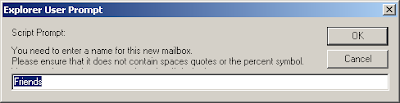
prompt() dialog in IE7 on Windows XP

prompt() dialog in IE 5/6 on Windows 95/98/98SE/ME/2000

This (due in part because of #4 above) is the biggest issue. Presenting any message other than "How many", or "What is your name" requires some thought because if your message is anything longer than a quick sentence, the content will get truncated!

7 Ugly. Just plain ugly

Normally a feature being ugly doesn't count as a bug, but in this case I disagree. Since the dialog does look ugly, and has not changed in 12 years, it highlights that this browser (now in version 7) hasn't been given the attention it needs and is not up to par with modern browsers.


8 Title / message

Why is the title "Explorer User Prompt" instead of "Microsoft Internet Explorer"?
What is the "Script Prompt" all about?
This dialog is not very user friendly.

9 Missing message box icon

Standard message boxes (mini dialogs) like this in Windows have an icon. The .alert() dialog has an exclamation icon, the .confirm() dialog has a question mark icon etc. So where is the question mark icon for the prompt dialog?

Sample dialogs:


Firefox .alert();

Firefox .confirm();

Firefox close tabs dialog

Yet another IE dialog with an icon

10 No support for DBCS (Double Byte Character Sets
You can see this article on MSDN for more details, but there is no realistic workaround available.

As Web Developers build their sites and applications (which are getting more and more complex) it never ceases to amaze them that such a simple borwser feature has been given such neglect.


Example:

<script type="text/javascript">
prompt('You need to enter a name for this new mailbox.\n' +
'Please ensure that it does not contain spaces quotes or the percent symbol.\n' +
'You can change the name at a later time if desired.','Friends');
</script>


Known Workarounds: None. You can attempt to simulate a dialog, for user input using floating elements above the page, however you will need to build the entire "dialog" and will have to add code to enable draging etc.


Related Issues: None.